
A client opens a ticket: “My emails are going to spam.” No headers, no bounce message, no example. Just a claim — and one you can’t act on, because “spam” isn’t a state your server reports. The mail left the building fine. Something on the receiving side decided to junk it.
So before you touch anything, turn the vague complaint into the only two questions that actually decide whether Gmail and Outlook trust this server:
- Is the sending IP on a blocklist the big providers consult? — reputation.
- Do SPF, DKIM and DMARC actually resolve, the way the world sees them right now? — authentication.
Almost every “my mail goes to spam” ticket resolves to one of those two. Everything else — the mail client, the subject line, the time of day — is noise until you’ve cleared them.
Why it isn’t a “mail server problem”
The instinct is to log into the box and poke at Exim or Postfix. But the queue is empty and the logs say 250 OK — your server delivered. The rejection happened at the receiver’s edge, milliseconds later, based on two signals it computed before reading a single word of the message: does this IP have a reputation, and does this domain prove it authorized the mail. Restarting the MTA changes neither.
The manual path: Email → Deliverability
Open the server, go to Email, and switch to the Deliverability tab. Two cards answer the two questions — no dig, no third-party checker, no SSH.
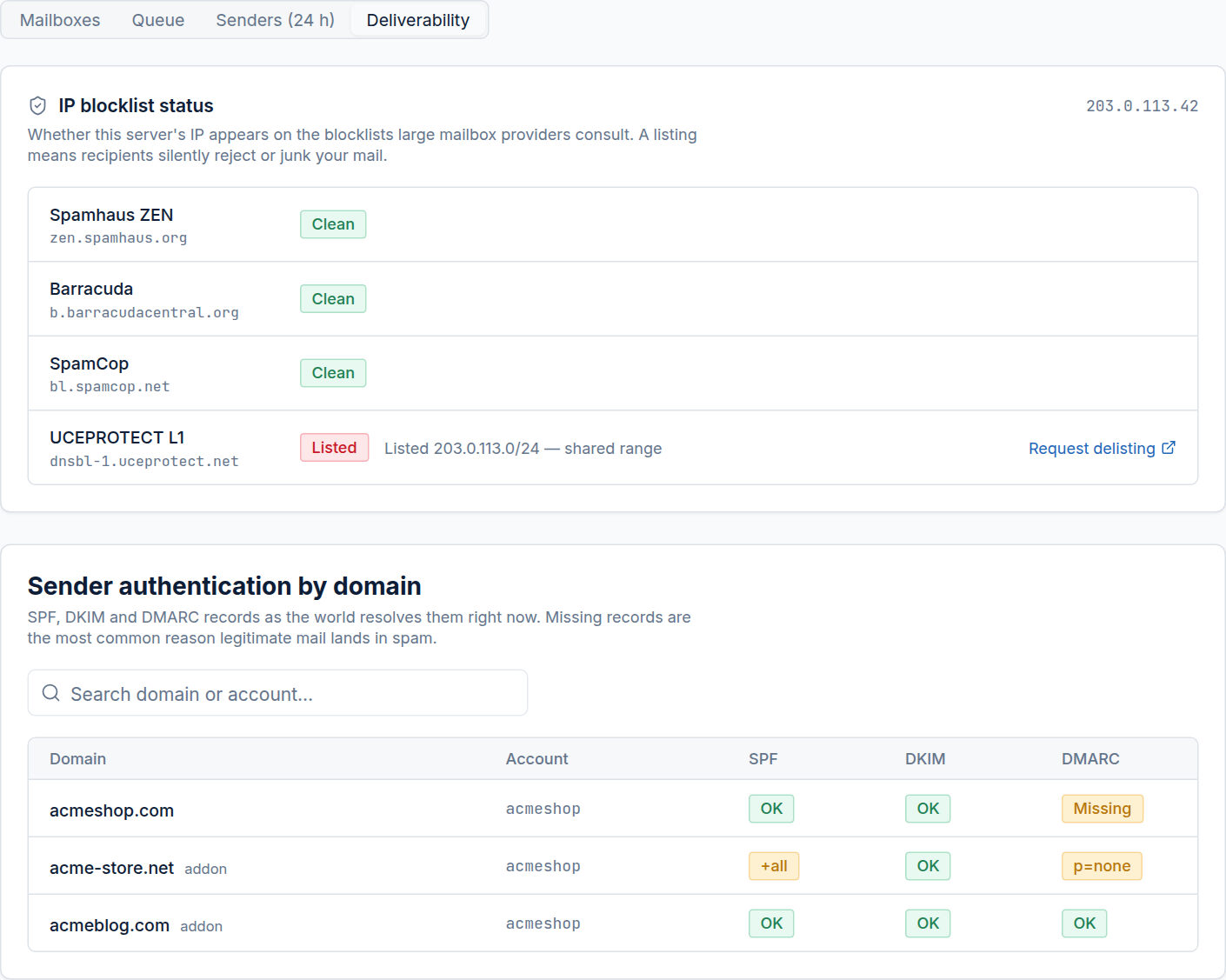
Card 1 — reputation
The top card sweeps the IP against the blocklists large mailbox providers actually consult — Spamhaus, Barracuda, SpamCop — and shows the verdict per list, with a Request delisting link the moment one comes back Listed.
Here the server is clean on every major list and flagged only by UCEPROTECT L1. That one matters less than it looks: UCEPROTECT lists entire /24 ranges over a single noisy neighbour, and most large receivers ignore it. Request delisting, sure — but don’t expect it to be the cause. Reputation is fine.
Card 2 — authentication (the usual culprit)
The second card resolves SPF, DKIM and DMARC for each hosted domain as live public DNS returns them right now — not what the panel’s zone editor thinks it published. That distinction is the whole point: a record can exist in the editor and still not resolve, because of a typo, the wrong zone, or a registrar override. This card shows what receivers actually see, which is the only version that counts.
And there’s the smoking gun:
acmeshop.com— SPF and DKIM pass, but DMARC is missing. Without DMARC, Gmail and Outlook have no policy to lean on and quietly downrank the mail.acme-store.net— SPF says+all(it authorizes the entire internet to send as this domain — worse than no SPF) and DMARC isp=none(published, but enforcing nothing).acmeblog.com— all three green. This is what a healthy domain looks like, and it’s why this one isn’t in spam.
The fix
Now the ticket is actionable:
- Publish a DMARC record for
acmeshop.com— start atp=noneto watch, then move toquarantine. - Replace
acme-store.net’s+allwith a realinclude:list of who’s actually allowed to send, and tighten DMARC offp=none.
Re-open the tab after DNS propagates and the chips flip to OK — confirmation the receiving world now sees what you intended, not a hopeful guess.
Two cards, a couple of minutes
That’s the manual path end to end: two cards turn an un-actionable complaint into a named cause and a concrete fix, without memorizing a single dig invocation or trusting a record just because the zone editor shows it.
The AI Assistant will do this same read-and-explain pass for you — and, behind an approval gate, write the missing records itself. But the Deliverability tab is the ground truth it reasons over, and on the day a client pings you about spam, it’s the fastest two questions you can answer.