
We’ve argued before that the endgame for SSH is to take it off the public internet entirely — no listener for scanners to find, no prompt to brute-force, no reachable daemon for the next OpenSSH 0-day. The technical move is trivial: one firewall rule and port 22 is gone.
So why is it still open on most fleets? Not because closing it is hard — because being locked out of your own server is terrifying, and a single deny tcp/22 is exactly how it happens. Close the port before you have another way in and the next time the dashboard is slow, or a deploy hangs at 2 a.m., your only recourse is the provider’s web console.
So the real task isn’t “close the port.” It’s “arrange two reliable ways in first, then close the port.” This post is the second half — done with CentralHost’s own tools rather than hand-edited firewall rules. Two doors:
- an everyday door for the daily work, and
- an emergency door for when everything else is on fire.
Everyday access: a terminal that needs no open port
The first door is the one you already use, and it’s why port 22 can close at all. The CentralHost agent on each host keeps a single outbound connection to the control plane — the same direction any HTTPS client crosses a firewall. Nothing on the host listens for you.
When you open a server’s Terminal, your session travels down the channel the agent already holds open. You get a real root shell in the browser, tied to your named account, and — because it’s the control plane, not raw SSH — recorded for audit like any other session. No inbound port is involved at any point, so this keeps working after port 22 is closed. For 99% of day-to-day work, this is your SSH.
But a channel that depends on the agent has one honest failure mode: if the agent is down, or the control plane itself is unreachable, that door won’t open. Which is the whole reason for the second one.
Emergency access: the bastion break-glass
The second door is deliberately independent of the first. CentralHost runs a bastion — a hardened, tunnel-only jump host — that lets you reach your servers with native SSH even when the control plane is having a bad day, or when you simply need real SSH tooling: rsync, scp, an IDE remote, Ansible.
The important part is what the bastion doesn’t do: it never holds credentials to your hosts. It’s a pure ProxyJump — an authenticated TCP switch. Your server stays bring-your-own: you log in with your own key, end-to-end, invisible to the bastion. Nothing in our infrastructure can get root on your fleet.
To arm it, you register a public key under Bastion keys. Paste one, upload a .pub, or have the browser generate an Ed25519 keypair on the spot — in which case the private half is offered as a one-time download and never touches our servers.
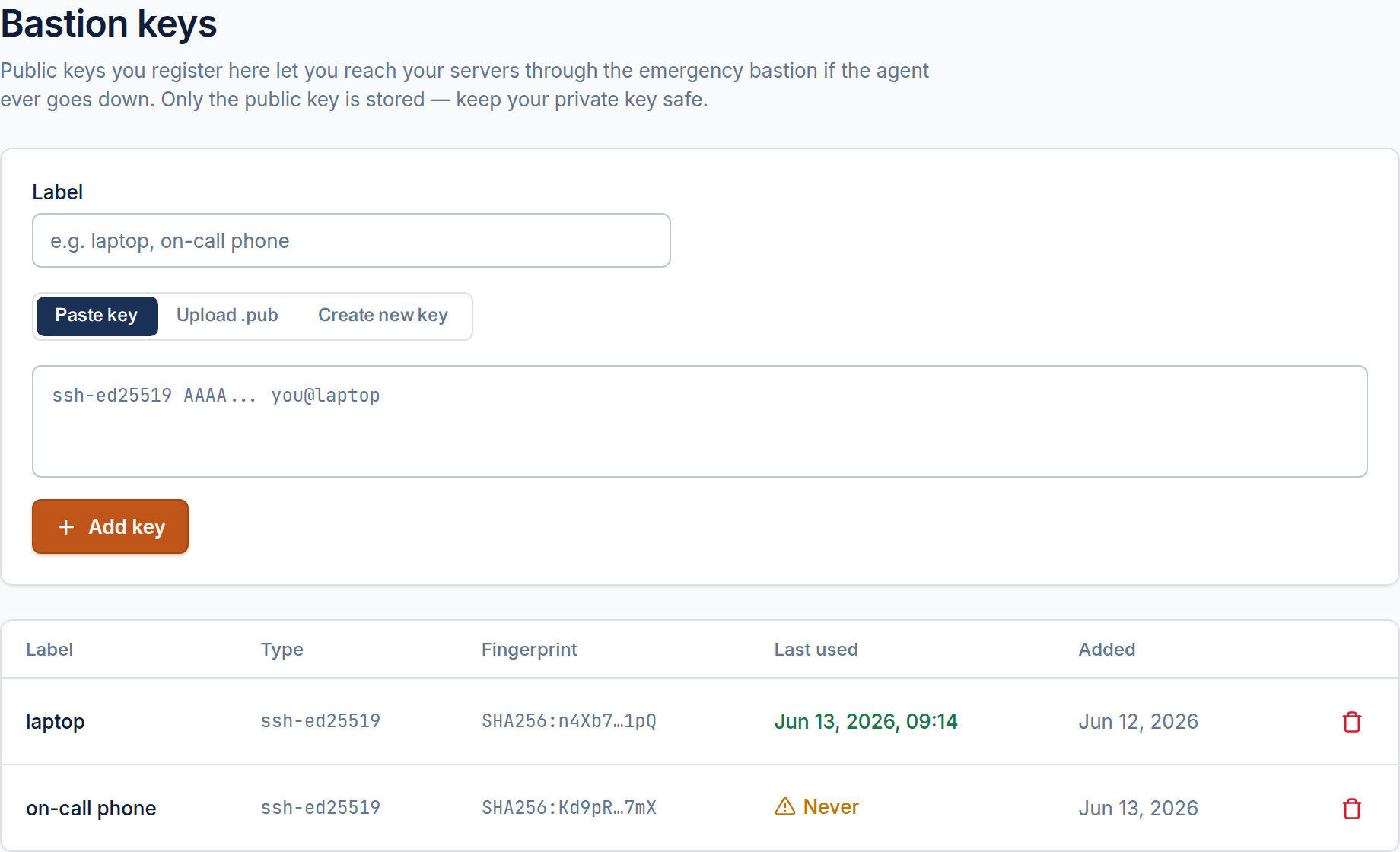
Notice the Last used column. A registered key that has never authenticated through the bastion is just a theory — and a theory is not a break-glass plan. So before you rely on it, run the drill once:
ssh -J jump@bastion.centralhost.sh root@your-host
If that lands you on the host, your emergency door works. That single successful connection is what flips the key from “Never” to a real, tested way in.
Closing the port — with a guard against yourself
Now, and only now, the door is safe to shut. Open the server’s Firewall section. With both ways in arranged, Bastion mode restricts SSH on port 22 to the bastion set and closes it to everyone else.
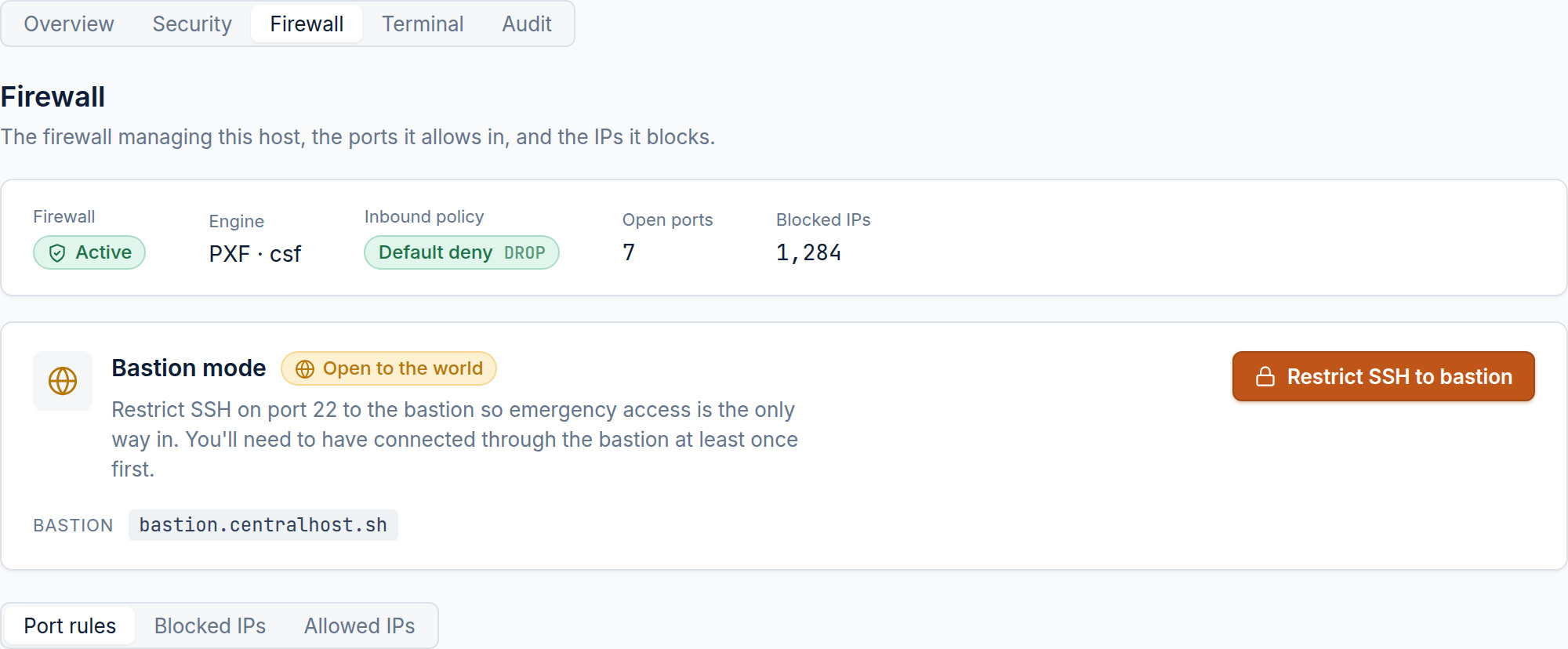
This is one button instead of hand-written firewall syntax — and it carries the safeguard the manual route can’t. CentralHost won’t let you close port 22 until that emergency door has been tested at least once. If you click Restrict SSH to bastion before any key shows a Last used timestamp, it refuses and points you back to register and verify a key. The lockout this whole post is about is the one failure the tool is built to prevent.
It also checks the right port. If a host moved sshd off 22, restricting the stored port would lock down the wrong one and leave real SSH wide open — so the apply reconciles against the port the agent actually detects before it touches anything.
And when you do need direct access again, the same card has a Reopen SSH to the world button — break-glass in the other direction, one click, no firewall archaeology.
The shape of it
everyday   you ─▶ control plane ◀─ agent ─▶ your host    (no inbound port)
emergency  you ─▶ bastion (ProxyJump) ─────▶ your host:22 (BYO key, bastion-only)
the world  ✕ ──────────────────────────────  port 22 closed
- Use the web terminal for daily work — it already needs no open port.
- Register a bastion key and make one real
ssh -Jconnection to prove it. - Switch on Bastion mode in the Firewall section; port 22 closes to everyone but the bastion.
After that, the brute-force counter reads zero — and the reason you can finally afford that is that you never gave up a way back in.