
It’s 2am. A site is down, you SSH in, and twenty minutes later it’s fixed. You edited a config, restarted a service, tweaked a limit, ran a one-off command you’d never type again. Then you close the terminal and go back to sleep.
Two weeks later, something on that server behaves oddly — and the only question that matters is what did I change that night? You open the box again and start reconstructing it from memory. Maybe history helps. Probably it doesn’t.
Here’s the uncomfortable part: SSH kept no copy of that night. A shell session is a transport, not a record. When the connection closes, the bytes are gone — the commands, their output, the order they ran in, the moment the thing actually broke. The only record left is your memory, and your memory is not a record.
Why history isn’t the answer
The usual reflex is “that’s what shell history is for.” It isn’t, and it’s worth being precise about why:
- It stores commands, never output. The
tailthat showed you the smoking gun? Gone. You kept the question, not the answer. - It’s per-user and editable. Anyone with the shell can
history -c, or just append a' 'to keep a command out of it. A record the subject can edit isn’t an audit trail. - It has no timing and no result. You can’t tell what ran at 2:14 versus 2:40, or whether the command succeeded — only that it was typed at some point.
None of that is a flaw in SSH. SSH was never trying to remember anything. The memory has to live somewhere else.
What CentralHost records instead
In CentralHost the web terminal isn’t a raw socket to the box — it runs through a control plane, and every operator session opened from the platform is recorded as it happens. Not the commands you remember typing: the actual session.
The audit view on each server lists them, newest first — who opened it, from which IP, when, how long it ran, how it ended:
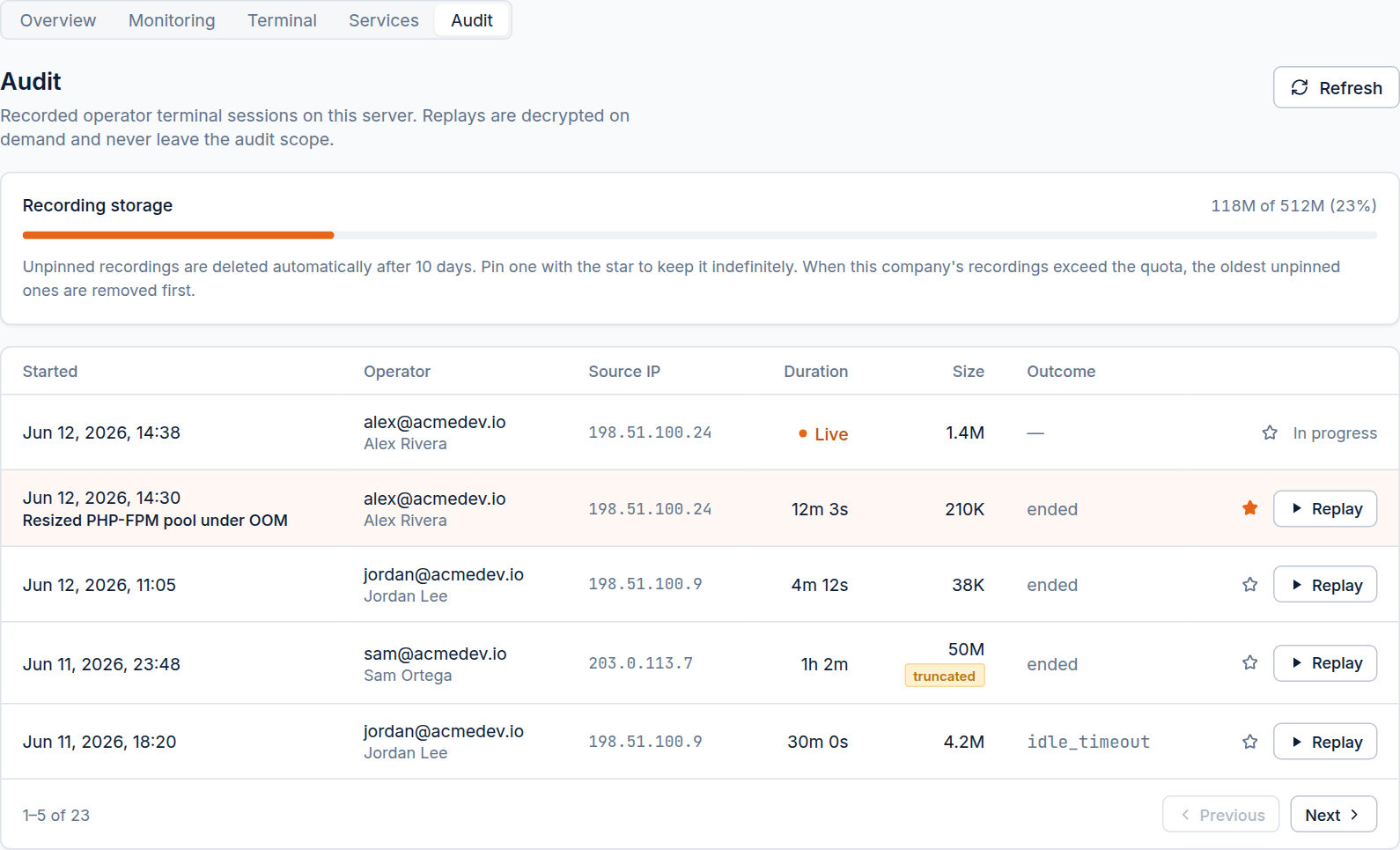
A live session shows as Live while it’s open. One that hit the 30-minute idle timeout says so. One that overran the size cap is flagged truncated instead of quietly pretending to be complete. The record is built to be honest about its own gaps, because a log that overstates is worse than no log.
The replay is the part that surprises people
A list of sessions is useful. Playing one back is the thing nobody expects on a web host.
Recordings are stored in asciicast format — the bytes and their timing — so a replay isn’t a flat text dump. It’s the session itself, played back: the top repaint, the progress bars, every command and the output it produced, in the order and at the pace it actually happened.
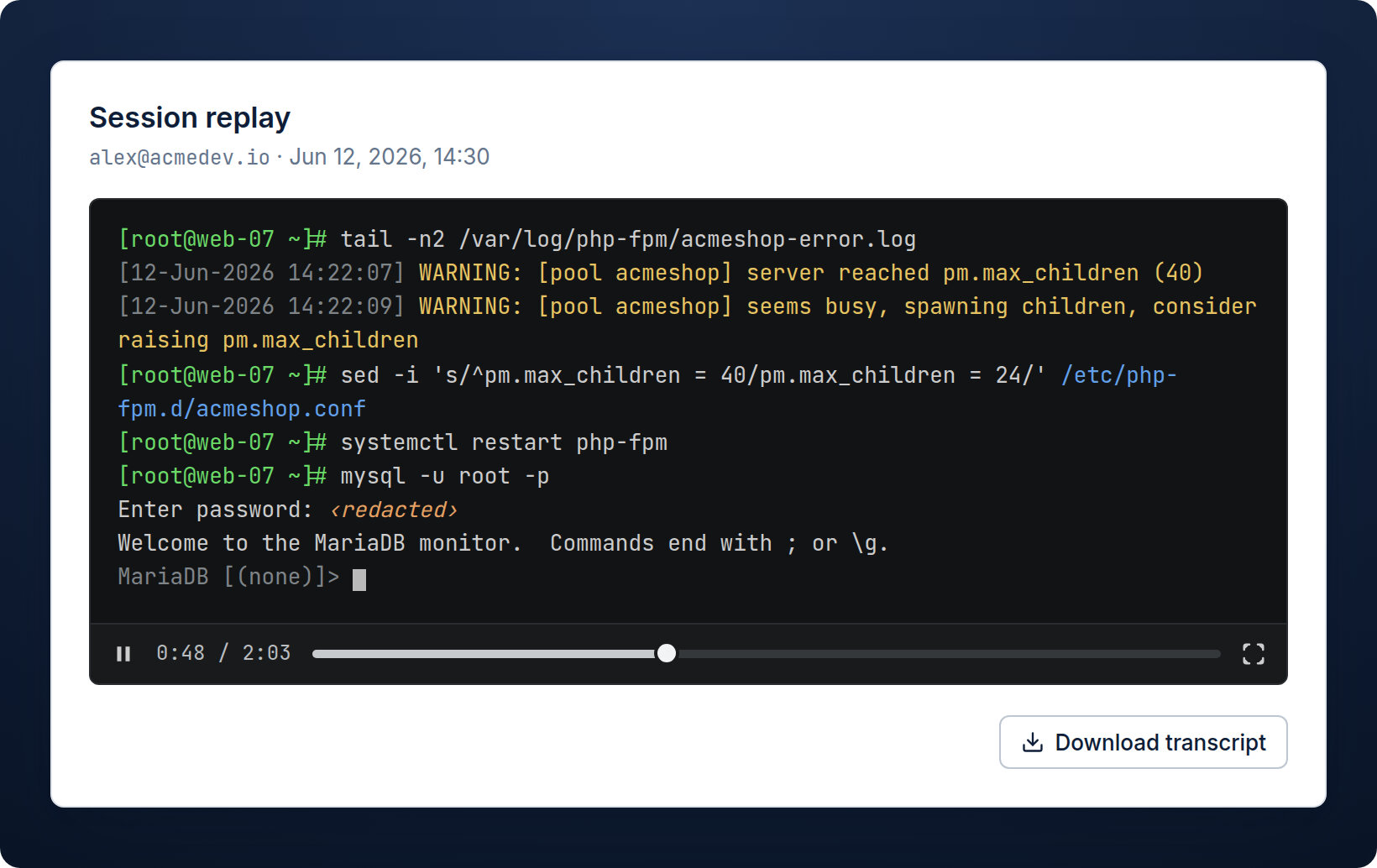
Look at the mysql -u root -p line. The password isn’t in the recording — it’s ‹redacted›. While the terminal has echo off (a password prompt, sudo, ssh, passwd), the keystrokes are dropped and replaced with a single marker. Not the secret, not its length, not the per-key timing. That redaction is what makes the recording safe to keep: you get a faithful replay of the work without a vault of plaintext passwords sitting in your audit log.
If you’d rather grep than watch, every recording also renders to a plain-text transcript — a line-oriented projection of the screen, progress bars collapsed to their final state, alt-screen apps like vim/htop filtered out. Same recording, two views: watch it or search it.
It’s a record, not a camera over your shoulder
This is the objection worth answering head-on: isn’t this just surveillance of my own team?
No — and the giveaway is that it’s just as valuable when you’re the only sysadmin. The value isn’t catching who did it. It’s three things that have nothing to do with mistrust:
- Memory. The 2am-two-weeks-later problem at the top of this post. A single operator forgets their own work; the recording doesn’t.
- Evidence. When a server is compromised, the recordings separate “this was my session” from “this wasn’t me.” The record exonerates as readily as it implicates — especially when a client is the one asking.
- Continuity. The day a second operator joins, the trail is already there. You don’t bolt it on after the first “wait, who touched this?”
And because the recording is captured at the control hub, not on the server, the subject can’t doctor it. A root user on the box can wipe their own history; they can’t reach back into the audit log and edit what the hub already wrote. The record is independent of the person it records.
What it costs you to keep
Recordings are compressed and encrypted per company, then aged out on a retention window you set (10 days by default). Hit one you want to keep — a tricky migration, an incident worth a post-mortem — and you pin it with the star; pinned recordings are exempt from automatic deletion. A storage bar shows the footprint so the audit trail never quietly eats the disk.
The point
You already do careful work on these servers. What you don’t have, with a bare SSH session, is anything to show for it the next morning — to yourself, to a teammate, to a client. The session was real; the record of it evaporated.
SSH was never going to remember what you did that night. The platform you run it through should — and on CentralHost, it does, by default, with the secrets left out.