
A ticket comes in. A client’s site is throwing an error that only happens on production, the kind that won’t reproduce anywhere else, and the person who actually knows the code is their developer — or a plugin vendor’s support engineer, or the freelancer who built the thing two years ago. Whoever it is, they don’t work for you, and the fix lives on a server you are responsible for.
Now you have to decide how they get in. And every instinct you have is a bad one.
The options you have today are all bets you’ll lose
Share root. Fast, and catastrophic. That password now lives in someone else’s password manager, their chat history, maybe a sticky note. It doesn’t expire. It doesn’t rotate. When that engagement ends — or that vendor gets breached — the credential is still valid and you’ll never know it leaked. You’ve handed out a permanent key to a temporary problem.
Spin up a temporary SSH user. Better, in theory. In practice you’re now running a little bureaucracy: generate a key, scope the sudoers, remember to delete it when they’re done. That last step is the one that never happens. Six months later your /etc/passwd is a graveyard of support-acme, dev-temp, vendor2 — every one a forgotten door, none of them audited.
Screen-share and read commands aloud. Safe, and miserable. You’ve turned a senior engineer into a pair of remote hands typing what someone dictates over a call, getting half of it wrong, for an hour. Nobody’s time is worth this.
The thing all three have in common: they conflate operating the server with holding a credential to the server. You only want to grant the first. The tools force you to grant the second.
An invitation grants access without granting a credential
CentralHost splits those two apart. The guest never touches an SSH key or the root password. What you hand them is a one-time invitation link to a single terminal — and the privilege belongs to the platform’s control plane, not to the person clicking the link.
The model is deliberately strict: one invitation = one terminal = one sitting.
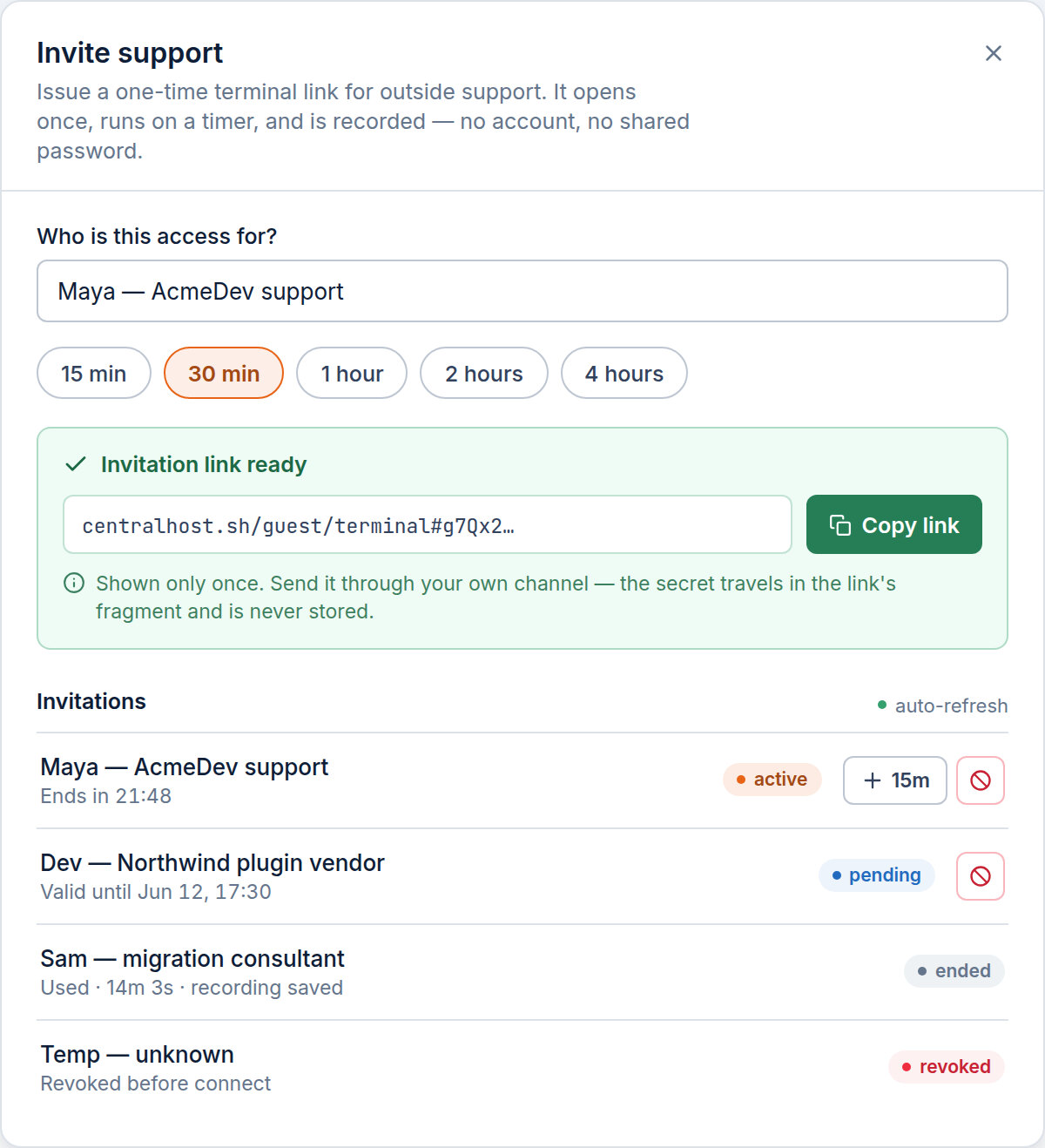
You open the Invite support dialog on the server’s Terminal section, answer one question — who is this access for? (e.g. “Maya — AcmeDev support”) — pick a maximum session length from a preset (15m, 30m, the default, up to a few hours), and you get a link. That label isn’t decoration: it becomes the title on the recording, so the audit trail reads “External support · Maya — AcmeDev” and not an anonymous blank.
You copy that link and send it to the person through your own channel — the email thread or chat where you already have a relationship with them. CentralHost doesn’t email a cold stranger on your behalf; the trust in that hand-off is yours, and we don’t get in the middle of it.
Two clocks, so a forgotten link can’t haunt you
There are two independent timers, and the distinction is the whole point:
- The link has a window to be opened. Send it, and if nobody redeems it, it quietly expires. An invitation that’s never used can’t be used later.
- The session clock starts on the first connect. The moment the guest actually opens the terminal, the token is burned — redeemed exactly once — and their maximum session time begins counting down.
So a link sitting in an inbox for a week is not a standing risk. It’s either opened soon, on your clock, or it’s dead. There’s no scenario where a stale invitation becomes a live door six months from now.
For the security-minded: the token travels in the URL fragment (the part after #), which browsers never send to the server. The secret that grants the session lives only in the link itself, and only the SHA-256 of it is stored on our side.
Closing the terminal is the same as ending the session
This is the rule that makes the whole thing safe to hand out: closing consumes the session. exit in the shell, closing the tab, a refresh, even the connection dropping — any of them burns the window. The control hub trims the session’s expiry the instant the guest disconnects, so the same link won’t reconnect. One sitting, then it’s spent.
It means you don’t have to trust the guest to “log out properly.” There’s no lingering session to clean up, no door left ajar. They do the work, they close the tab, and the access is gone. If they genuinely need to come back, that’s a new invitation — a deliberate act on your side, not a reused token on theirs.
You keep the controls the whole time
The guest is operating, but you’re holding the dial:
- Extend in place. Underestimated the job? While the session is alive (or in a short grace window after), add minutes from the same dialog — the guest’s link keeps working, the clock just moves. You’re topping up time, not reissuing access.
- Kill switch. Something looks wrong? Revoke it, and the hub doesn’t just block the next connect — it drops the live PTY. A watchdog re-checks every few seconds, so a revoke lands on a session in progress, not only on the next one.
- A dead link stays dead. Revocation is a final state. You can extend a living session, but you can’t resurrect a spent or revoked one — for another occasion, you issue a fresh invitation. There’s no “reactivate” that quietly turns an old link back on.
And all of it is on the record
Because this is the same control-plane terminal your own operators use, a guest session is recorded exactly like any other — the keystrokes, the output, the timing, played back later in the server’s Audit section. (Here’s how that recording works, and why secrets like a mysql -p password are redacted out of it.)
The difference is the label. A guest has no account identity, so the recording carries a “Guest” chip where the operator name would be, plus the label you set when you invited them. Two weeks later, when you — or the client — ask what did that vendor actually do on the box?, the answer isn’t a shrug. It’s a replay, attributed, titled, and impossible for the guest to doctor, because it was captured at the hub and never on the server they were touching.
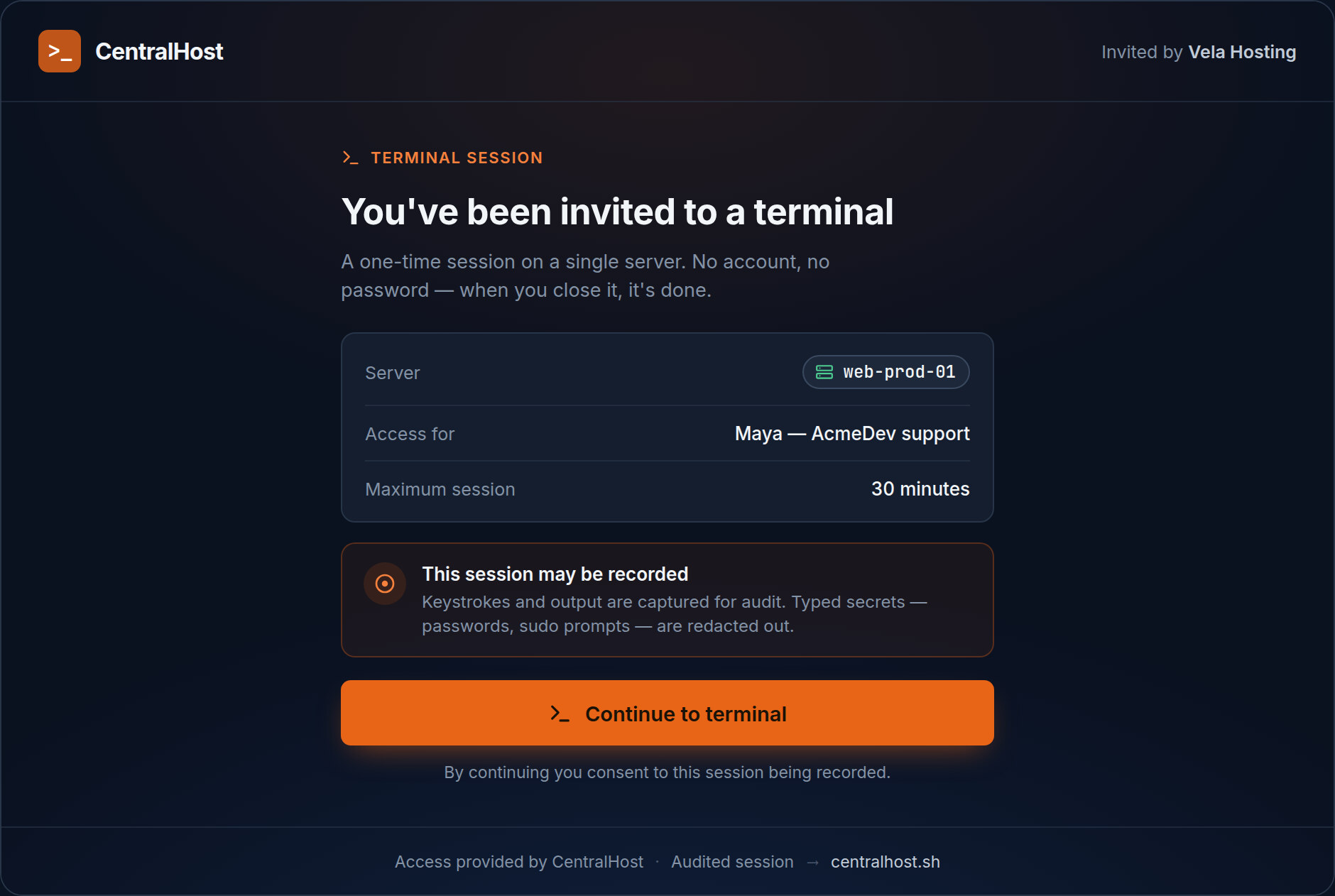
The guest sees this coming, too. Their screen is chrome-less — just the terminal, no sidebar, no account, a clear “invited by {your company}” and a live countdown — and before the first keystroke there’s a one-click consent gate: this session may be recorded for audit purposes. No surprise, no ambiguity. They know they’re a guest in a recorded room, and they agreed to it.
The point
Outside support is a normal part of running other people’s servers. The mistake is treating “let them in” as a credential problem, because credentials are permanent and people are temporary — and that mismatch is exactly where leaked passwords and forgotten dev-temp accounts come from.
CentralHost treats it as an access problem instead. One link, one terminal, one sitting. It expires on its own, you can end it sooner, the guest never holds a key to your server, and every second of it is on the record with their name on it. You gave them the work. You never gave away the keys.