
A client opens a ticket three days after you last logged into their server: “Something changed on our box. Did your team touch the mail config on Tuesday?”
You probably didn’t. Or you did, for an unrelated reason, and it’s fine. Either way you’re now in the worst kind of conversation — one where the honest answer is “let me check” and the only place to check is your own memory. You assert; they decide whether to believe you. On a machine you don’t own, holding root they granted you, “trust me” is a weak hand.
The thing that turns that conversation from defensive to trivial isn’t more trust. It’s a record — and on a fleet of servers you administer for other people, that record has to exist before the question, not be assembled after it.
The asymmetry nobody mentions in the sales call
Managing servers for clients is a trust position dressed up as a technical one. You hold root on infrastructure that runs their business. They can’t watch over your shoulder, and they shouldn’t have to. What they’re owed instead is the ability to ask, at any time, what happened on our server — and get a straight, verifiable answer.
Most setups can’t give them one. SSH leaves nothing behind (a shell session forgets itself the moment it closes), shell history is per-user and editable, and “our process is that we’re careful” is not evidence. So the answer defaults to your word. That works right up until the one time it doesn’t — an incident, a dispute, an audit — which is exactly when your word is worth the least.
What you can actually hand them
In CentralHost, every operator terminal opened against a server is recorded through the control plane. So when the question comes, you’re not reconstructing anything — you’re reading it off.
The audit view for their server lists every session: who opened it, from where, when, how long, and how it ended.
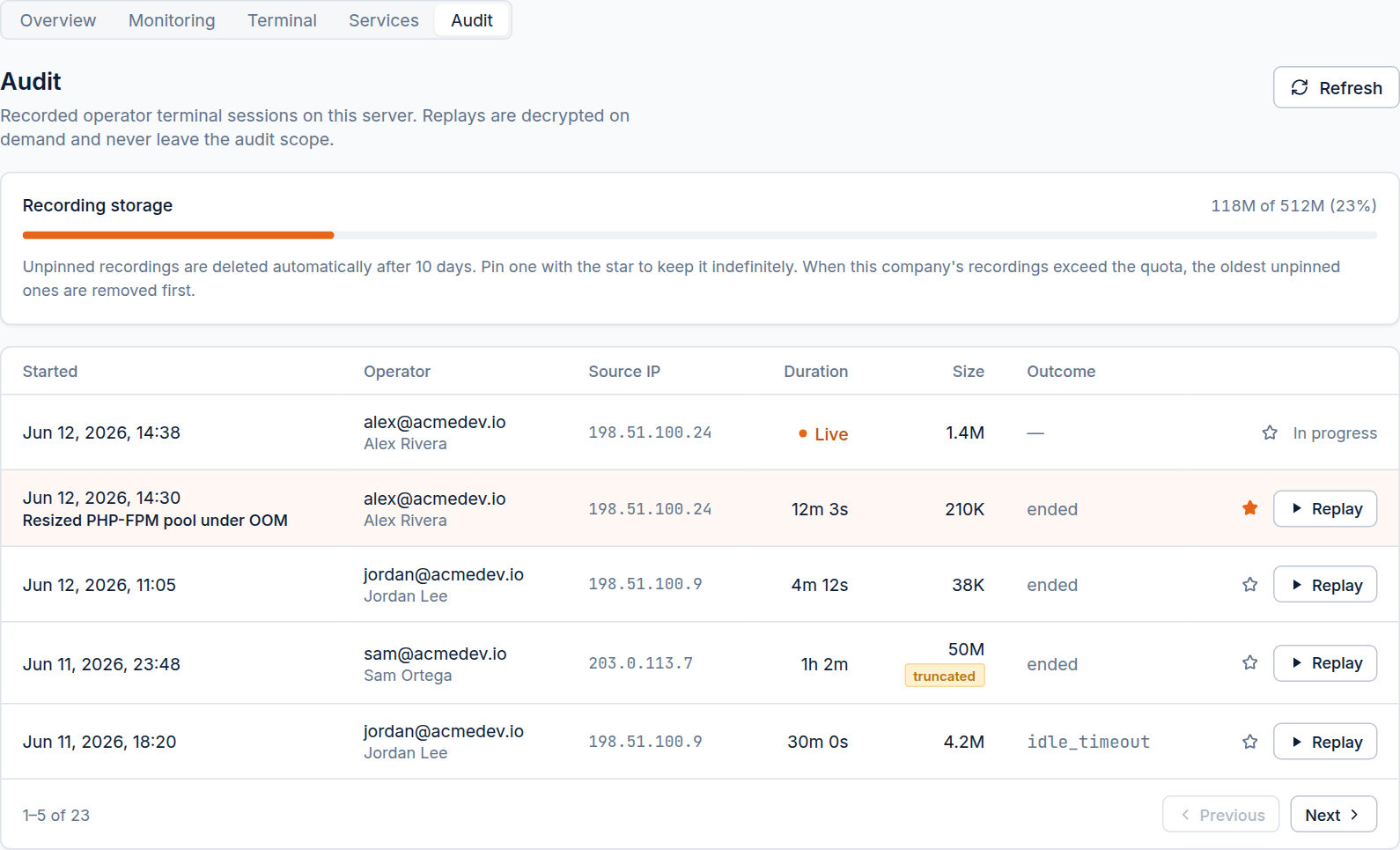
Right there is the answer to “did anyone touch this on Tuesday” — without opening the box, without trusting anyone’s recollection. And if the conversation needs more than a timestamp, you can play the session back.
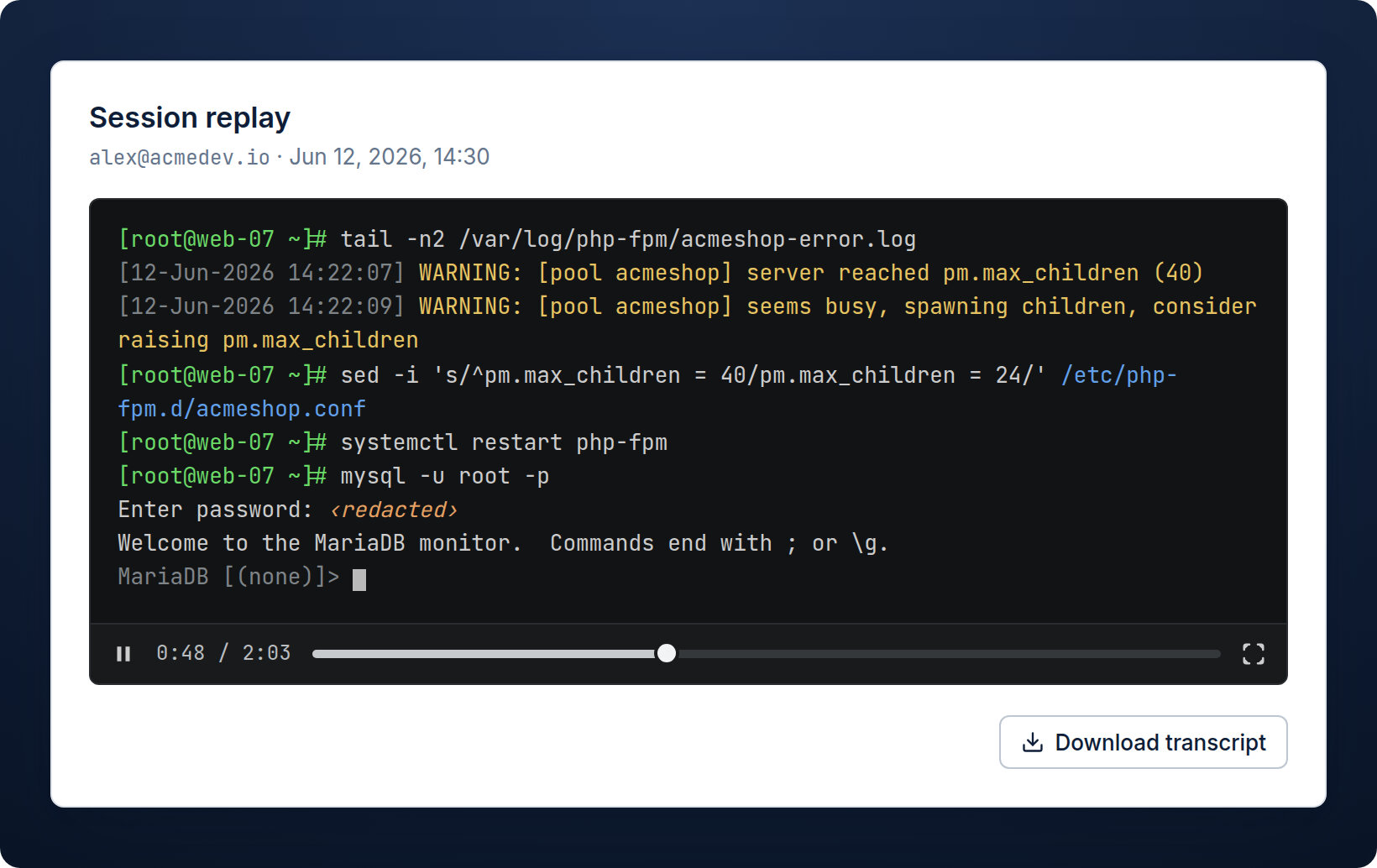
This is the part that ends the dispute. It’s not a summary you wrote; it’s the session itself — the commands, the output, the order. If your team resized an FPM pool, they see the FPM pool being resized. If your team didn’t touch the mail config, the absence is just as visible. You can download a plain-text transcript and paste the relevant lines straight into the ticket.
A record is only worth handing over if it’s honest
A doctored or selective record is worse than none — so the recording is built to be trustworthy without anyone having to vouch for it:
- Secrets are redacted. Password prompts,
sudo,mysql -p— anything typed with terminal echo off — appear as‹redacted›. You can share the recording with a client and never leak a credential in the process. - It’s captured off the server. Recording happens at the control hub, not on the box, so the person being recorded can’t edit or delete it. A root user can wipe their
history; they can’t reach the audit log. - It admits its own gaps. If a recording was capped or dropped frames under load, it’s flagged
truncated/lossy. The record never claims to be more complete than it is — which is precisely what makes the parts it does show credible.
That last point matters more than it looks. The value of the record to a skeptical client is that it doesn’t flatter you. It exonerates and implicates with the same indifference — which is why “here, look” lands where “trust me” doesn’t.
It cuts the other way too
The framing so far is defensive, but the same record is how you clear your team. “Our last session on that server ended Monday at 18:20 and didn’t go near the mail config — here’s the replay” is a five-second, unarguable response. Without it, you’re litigating memory against a client’s suspicion, and you lose that one even when you’re right.
Keep the ones that matter
Recordings age out on a retention window (10 days by default), compressed and encrypted per company. For the sessions that might come up later — a migration on a sensitive account, an incident with a post-mortem — pin them with the star and they’re kept indefinitely, out of reach of the cleanup. The audit trail for your most important work is then permanent by choice, not luck.
The point
On servers you administer for other people, accountability can’t be a thing you switch on after an incident — by then the session is gone and you’re back to your word against theirs. It has to be the default: recorded as the work happens, honest by construction, ready to hand over.
So the next time a client asks what you did on their server, the answer isn’t a careful paragraph. It’s a link to the replay.